Table of Contents
If you’ve ever excitedly unboxed a standing desk converter only to discover it perches awkwardly on your corner desk like a mismatched puzzle piece, you’re not alone. The unique geometry of corner workstations—whether L-shaped, triangular, or curved—creates a frustrating paradox: most standing desk converters are engineered for standard rectangular desks, leaving corner desk owners with limited options that often compromise stability, ergonomics, or usable surface area. This guide dismantles that challenge piece by piece, giving you the expert framework to identify converters that genuinely integrate with your corner setup without the trial-and-error that leads to costly returns and workspace disruption.
Understanding what “actually fits” requires more than checking width dimensions. It demands a holistic grasp of corner desk architecture, weight distribution physics, and ergonomic zoning principles that most product descriptions gloss over. We’ll decode the technical specifications that matter, expose the marketing language that leads to poor purchasing decisions, and equip you with a measurement protocol that eliminates guesswork. Whether you’re working with a compact 90-degree corner desk or an expansive executive L-shaped workstation, this comprehensive framework ensures your investment transforms your workspace rather than complicating it.
Top 10 Corner Standing Desk Converter
Detailed Product Reviews
1. VIVO Extra Wide 38 inch Corner Desk Converter, K Series, Height Adjustable Sit to Stand Riser, Dual Monitor and Laptop Workstation with Wide Keyboard Tray, Black, DESK-V000KL
 and Laptop Workstation with Wide Keyboard Tray, Black, DESK-V000KL](https://m.media-amazon.com/images/I/41pKou67Z0L._SL160_.jpg)
Overview: The VIVO Extra Wide 38-inch Corner Desk Converter transforms static corner workstations into dynamic, health-focused environments. Designed specifically for corner desks and cubicles, this riser delivers a spacious 37.5" x 18" surface that accommodates dual monitors or laptop setups while maintaining a compact footprint. The integrated 37" x 12" keyboard tray synchronizes with the main surface, creating an ergonomic typing position throughout its 4.3" to 20" height range.
What Makes It Stand Out: This model’s patented design shines with an exceptionally wide keyboard tray that rivals the main surface width, providing unparalleled mouse and keyboard real estate. The pneumatic spring mechanism enables effortless transitions, while the impressive 20-inch maximum height adjustment exceeds most competitors, making it ideal for taller users. The steel frame construction ensures durability, supporting 33 lbs on the desktop and 4.4 lbs on the keyboard tray.
Value for Money: Positioned in the mid-range price bracket, this converter offers excellent value for corner-specific applications. You’re investing in VIVO’s proven reliability and patented engineering without paying premium full-desk replacement costs. The extensive height range alone justifies the price point compared to basic fixed-height risers.
Strengths and Weaknesses: Strengths include the extra-wide keyboard tray, superior 20" height adjustment, sturdy steel construction, and near-zero assembly. Weaknesses are the modest 4.4 lb keyboard tray capacity, limited color options (black only), and surface depth that may feel constrained for users wanting more workspace real estate.
Bottom Line: For corner desk users prioritizing ergonomic keyboard positioning and maximum height flexibility, this VIVO model delivers exceptional functionality. It’s a smart investment for health-conscious professionals seeking a proven, hassle-free standing solution.
2. VIVO 43 inch Corner Height Adjustable Cubicle Stand Up Desk Converter, V Series, Quick Sit to Stand Tabletop Dual Monitor Riser Workstation, Black, DESK-V000VC
 Riser Workstation, Black, DESK-V000VC](https://m.media-amazon.com/images/I/517aMgUqrpL._SL160_.jpg)
Overview: The VIVO 43-inch Corner Height Adjustable Desk Converter expands your workspace with a generous 43.3" x 28.3" surface that works seamlessly on both corner and traditional desks. This versatile riser accommodates single or dual monitor configurations while the 28.2" x 10.6" keyboard tray maintains ergonomic alignment during height transitions from 6" to 17". Dual pneumatic springs provide smooth, stable lifting for uninterrupted workflow.
What Makes It Stand Out: Versatility defines this model—it functions equally well on corner and standard desk configurations, eliminating the need for multiple products. The substantial surface depth (28.3") offers room for monitors, documents, and accessories simultaneously. Dual pneumatic springs ensure reliable, wobble-free adjustments, while the innovative touch-lock mechanism provides precise height control with minimal effort.
Value for Money: This converter commands a modest premium over smaller models but delivers significantly more workspace and dual-desk compatibility. The investment pays dividends for users with larger monitor setups or those who may relocate between desk types. Compared to purchasing separate corner and standard converters, it represents substantial savings.
Strengths and Weaknesses: Strengths include generous surface dimensions, dual-spring stability, versatile application, and straightforward assembly. Weaknesses involve the relatively shallow keyboard tray depth (10.6"), limited 17" maximum height (less than some competitors), and the tray’s reduced width compared to the main surface, which may constrain some ergonomic layouts.
Bottom Line: This 43-inch VIVO converter excels for professionals needing maximum adaptability and workspace. It’s particularly valuable for shared offices or users anticipating desk changes, making it a versatile, future-proof ergonomic investment.
3. VIVO 43 inch Corner Height Adjustable Cubicle Stand Up Desk Converter, V Series, Quick Sit to Stand Tabletop Dual Monitor Riser Workstation, Rustic Vintage Brown, DESK-V000VCN
 Cubicle Stand Up Desk Converter, V Series, Quick Sit to Stand Tabletop Dual Monitor Riser Workstation, Rustic Vintage Brown, DESK-V000VCN](https://m.media-amazon.com/images/I/51jLXl-ORAL._SL160_.jpg)
Overview: The VIVO 43-inch Corner Desk Converter in Rustic Vintage Brown offers identical functionality to its black counterpart, delivering a spacious 43.3" x 28.3" surface with seamless height adjustment from 6" to 17". Designed for both corner and standard desk applications, this model features dual pneumatic springs and a 28.2" x 10.6" keyboard tray that synchronizes perfectly with the main surface, creating an ergonomic workstation tailored to health-conscious professionals.
What Makes It Stand Out: The rustic vintage brown finish distinguishes this model, providing warmth and character unmatched by standard black or white converters. This aesthetic versatility makes it ideal for home offices, executive suites, or design-conscious workplaces. Beyond appearance, it retains the series’ hallmark dual-pneumatic spring system and universal desk compatibility, ensuring you don’t sacrifice performance for style.
Value for Money: Priced identically to the black version, this converter delivers premium aesthetic choice without cost penalty. The rustic finish adds perceived value for users furnishing home offices or client-facing spaces. You’re investing in the same robust engineering and generous workspace while gaining design flexibility that complements wood furniture and warmer decor schemes.
Strengths and Weaknesses: Strengths mirror the standard model: expansive surface, dual-spring reliability, versatile application, and now—distinctive rustic styling. Weaknesses include the same shallow keyboard tray depth, 17" height limitation, and the fact that the rustic finish may clash with ultra-modern office aesthetics or corporate uniformity standards.
Bottom Line: Choose this rustic variant if you value the 43-inch VIVO’s performance but desire a more refined, furniture-like appearance. It’s an excellent choice for home offices and design-aware professionals wanting ergonomic benefits without industrial aesthetics.
4. VIVO Corner Height Adjustable 38 inch Standing Desk Converter, Quick Sit to Stand Tabletop Dual Monitor Riser Workstation, DESK-V037MC

Overview: The VIVO Corner Height Adjustable 38-inch Standing Desk Converter delivers ergonomic flexibility in a compact, purpose-built design. With a 37" x 19" surface and 36.6" x 11.3" keyboard tray, this riser optimizes corner desk configurations while supporting dual monitor setups. The pneumatic spring mechanism enables smooth height transitions from 4.7" to 16", creating an active workspace that combats sedentary fatigue without requiring desk replacement.
What Makes It Stand Out: This model emphasizes simplicity and keyboard ergonomics with its notably wide keyboard tray that nearly matches the main surface width. The straightforward pneumatic lift system moves vertically without forward projection, maintaining a consistent footprint. Its minimal assembly requirement—essentially ready out of the box—appeals to users wanting immediate functionality without complex setup procedures.
Value for Money: This converter competes aggressively in the entry-to-mid-range segment, offering VIVO’s reliability at an accessible price point. While lacking some premium features of larger models, it provides essential standing desk benefits without unnecessary complexity. For budget-conscious buyers or those with modest equipment needs, it represents practical, focused value.
Strengths and Weaknesses: Strengths include the wide keyboard tray, smooth vertical lift, sturdy 33-lb capacity, and true minimal assembly. Weaknesses are the relatively low 16" maximum height, limited surface depth compared to 43-inch models, and absence of dual-spring reinforcement, which may affect stability at full extension with heavy loads.
Bottom Line: This streamlined 38-inch converter serves corner desk users seeking essential standing functionality without premium cost. It’s ideal for straightforward dual-monitor setups where simplicity, keyboard ergonomics, and value outweigh maximum height and surface area requirements.
5. Lubvlook 47 inch Corner Standing Desk Converter, Height Adjustable Sit Stand Desk Riser, Black, GSD06T
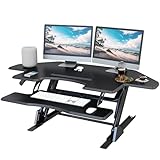
Overview: The Lubvlook 47-inch Corner Standing Desk Converter delivers the largest surface area in this category, transforming conventional desks with a spacious 47.2" x 23.6" workspace. This riser accommodates extensive dual-monitor configurations while the 31.5" x 11.8" keyboard tray maintains ergonomic positioning. Dual-pneumatic springs provide smooth height adjustment from 5.9" to 17.3", and the steel frame supports up to 33 lbs, creating a stable, health-focused workstation.
What Makes It Stand Out: Sheer size distinguishes this converter—its 47-inch width offers substantially more real estate than typical 38-43 inch models, enabling triple-monitor setups or expansive document spreads. The advanced dual-pneumatic spring system ensures reliable, even lifting across this larger surface. Quick assembly requiring only feet and keyboard tray attachment minimizes setup time, while the clean black finish suits professional environments.
Value for Money: This converter typically undercuts premium brand pricing while delivering superior surface area. For users prioritizing workspace expansion over brand recognition, it offers compelling cost-per-square-inch value. The robust feature set—dual springs, steel frame, generous height range—matches competitors at a potentially lower price point.
Strengths and Weaknesses: Strengths include maximum surface dimensions, dual-spring stability, quick assembly, and competitive pricing. Weaknesses involve Lubvlook’s lesser-known brand reputation, a keyboard tray disproportionately small relative to the vast main surface, and potential quality control variability compared to established manufacturers like VIVO.
Bottom Line: For professionals demanding maximum workspace without maximum budget, this 47-inch converter delivers impressive capacity and functionality. It’s best suited for users comfortable with emerging brands who prioritize surface area above all else.
6. VIVO 43 inch Corner Electric Height Adjustable Cubicle Stand Up Desk Converter, VE Series, Sit to Stand Tabletop Dual Monitor Riser with USB Port, Black, DESK-V000VCE

Overview: The VIVO VE Series delivers electric-powered ergonomic transformation for corner workstations. This 43-inch converter sits atop existing desks, enabling seamless transitions between sitting and standing positions. Designed specifically for cubicle and L-shaped environments, it accommodates dual monitor setups while maximizing corner space efficiency through its thoughtfully proportioned surface.
What Makes It Stand Out: The electric lift mechanism distinguishes this model from pneumatic competitors, offering whisper-quiet height adjustments from 6.5 to 16.2 inches via an elegant control panel. The integrated USB port provides convenient device charging without reaching for wall outlets. Patented engineering ensures reliable performance, while minimal assembly requirements mean immediate deployment. The spacious 43.3" x 22" surface comfortably houses dual monitors with room for accessories.
Value for Money: Positioned in the mid-to-premium tier, the electric functionality justifies the investment for users who adjust height frequently. While more expensive than manual alternatives, the one-touch operation saves significant time and physical effort throughout the workday. The 33-pound total capacity supports most professional setups, though the keyboard tray’s 5-pound limit requires careful equipment distribution. For electric convenience in corners, it offers competitive pricing.
Strengths and Weaknesses: Strengths include effortless electric operation, quiet motor performance, generous surface area, and integrated USB charging. The sturdy construction inspires confidence for daily use. Weaknesses involve a limited height range compared to some competitors, restrictive keyboard tray capacity, and a control panel that feels less premium than expected. The 33-pound overall capacity, while adequate, may constrain users with heavier monitor setups.
Bottom Line: Ideal for professionals prioritizing electric convenience in corner configurations. The VIVO converter excels for those seeking smooth, effortless transitions without manual pumping, though users requiring greater height range or heavier load capacity should explore alternatives.
7. JD Concept 32 inch White Corner Standing Desk Converter, Assembled One-Click Sit to Stand up Desk Riser, for Dual Monitor and Laptop Height Adjustable Workstation

Overview: The JD Concept 32-inch white converter brings ergonomic flexibility to corner workstations through its intelligent triangular design. This pneumatic riser arrives fully assembled, offering immediate transformation of L-shaped desks or cubicle corners into dynamic sit-stand stations. The clean white finish brightens office environments while delivering core height-adjustment functionality without complex installation.
What Makes It Stand Out: The reversible triangle configuration maximizes corner space utilization while offering orientation flexibility for left or right corners. Its durable pneumatic spring enables quick height adjustments from 5.5 to 20 inches with a simple one-click mechanism. The scratch-resistant steel frame ensures longevity, while the 33-pound capacity supports dual-monitor or laptop-plus-monitor configurations. The true zero-assembly design represents genuine plug-and-play convenience.
Value for Money: This model strikes an excellent balance between affordability and functionality. Competing with electric models at nearly half the price, the pneumatic system delivers reliable performance for users comfortable with manual adjustments. The generous 20-inch height range exceeds many electric competitors, accommodating users from 5'2" to 6'4". For budget-conscious buyers needing corner-specific solutions, it eliminates both cost and setup barriers.
Strengths and Weaknesses: Strengths include zero-assembly convenience, versatile corner orientation, impressive height range, and cost-effectiveness. The steel construction provides sturdy stability at mid-level heights. Weaknesses involve pneumatic operation requiring physical effort that may challenge some users, a smaller 32-inch surface limiting monitor space, and potential wobble at maximum extension. The keyboard platform lacks independent tilt adjustment for ergonomic fine-tuning.
Bottom Line: A smart choice for budget-conscious buyers needing corner-specific solutions. The JD Concept converter delivers core sit-stand benefits without frills, best suited for users prioritizing setup simplicity and value over powered convenience.
8. Lubvlook 32 inch Corner Standing Desk Converter, Height Adjustable Sit Stand Desk Riser with Keyboard Tray, Black, GSD76

Overview: The Lubvlook GSD76 offers a minimalist approach to corner desk conversion, featuring a 32-inch surface with pneumatic height adjustment. Designed for straightforward functionality, this black riser targets users seeking essential sit-stand capabilities without complexity or premium pricing. The hidden handle design emphasizes clean aesthetics while maintaining practical ergonomics.
What Makes It Stand Out: The concealed control handle creates an uncluttered workspace appearance that distinguishes it from bulkier competitors. Requiring only keyboard tray attachment, setup takes under five minutes. The pneumatic lift provides smooth transitions through a 4.7 to 16-inch range, while the compact 32" x 18" footprint fits tight corners where larger converters cannot. The minimalist profile integrates seamlessly into modern office environments.
Value for Money: Among the most budget-friendly corner converters available, this model makes standing desks accessible to price-sensitive buyers. However, the 22-pound weight capacity significantly restricts equipment choices compared to standard 33-pound competitors. For users with lightweight single-monitor or laptop setups, the value proposition remains strong. Dual-monitor users will likely exceed capacity limits, requiring careful weight calculation before purchase.
Strengths and Weaknesses: Strengths include ultra-clean minimalist design, rapid five-minute assembly, affordable pricing, and smooth pneumatic operation. The compact footprint suits small corners perfectly. Critical weaknesses are the low 22-pound capacity excluding many dual-monitor setups, limited height range, narrow 9.5-inch keyboard tray, and reduced stability compared to heavier-duty models. The minimalist approach sacrifices ergonomic refinements like independent keyboard positioning.
Bottom Line: Best suited for minimalists with lightweight computing needs. The Lubvlook converter serves single-laptop or monitor users admirably but falls short for demanding dual-display configurations. Consider only if your equipment falls well under the strict weight limit.
9. JD Concept 32 inch Black Corner Standing Desk Converter, Assembled One-Click Sit to Stand up Desk Riser, for Dual Monitor and Laptop Height Adjustable Workstation
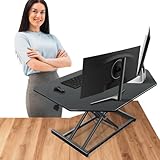
Overview: Functionally identical to its white counterpart, the JD Concept 32-inch black converter delivers the same triangular corner optimization in a professional dark finish. This pneumatic riser arrives fully assembled, providing immediate ergonomic benefits for L-shaped desks and cubicle corners. The black aesthetic integrates seamlessly into corporate environments and matches darker office furniture without compromising performance.
What Makes It Stand Out: The reversible triangle design maximizes corner space utilization while offering orientation flexibility for left or right configurations. Its durable pneumatic spring facilitates height adjustments from 5.5 to 20 inches through an intuitive one-click mechanism. The scratch-resistant steel construction and 33-pound capacity support dual-monitor setups effectively. Color choice becomes the primary differentiator, allowing aesthetic coordination without functional compromise.
Value for Money: Sharing the same accessible pricing as the white version, this model offers exceptional value for corner-specific applications. The pneumatic system keeps costs well below electric alternatives while maintaining competitive specifications. For users prioritizing professional appearance matching, the black finish delivers identical performance without premium pricing. The 20-inch height range accommodates diverse user heights, enhancing long-term value.
Strengths and Weaknesses: Strengths include zero-assembly convenience, versatile corner orientation, extensive height range, and sturdy steel construction. The 33-pound capacity accommodates most professional setups comfortably. Weaknesses mirror the white version: manual pneumatic operation requires user effort, the 32-inch surface may feel cramped for larger dual-monitor arrangements, and stability concerns at maximum height. No independent keyboard tilt adjustment limits ergonomic customization.
Bottom Line: Choose based purely on aesthetic preference. This black variant excels in professional settings where coordinated appearance matters, delivering reliable sit-stand functionality at an accessible price point with identical performance to its white counterpart.
10. VERSADESK® PowerPro™ 36" Corner Standing Desk Converter, 36 Inch Motorized Height-Adjustable Standup Desk Riser Sit to Stand Desktop with Keyboard and Mouse Tray + USB Charging Port, Black

Overview: The VERSADESK PowerPro 36 represents the premium tier of corner converters, featuring electric height adjustment and an exceptional 80-pound weight capacity. This heavy-duty riser targets power users requiring robust support for multiple monitors and equipment in corner configurations. Professional-grade construction and patented engineering deliver uncompromising performance for demanding workflows.
What Makes It Stand Out: The patented xLift design utilizes dual scissor-shaped arms for superior stability and safety throughout an industry-leading 20-inch height range. Supporting up to three monitors and 80 pounds, it far exceeds typical converter capacities. Three predrilled grommet holes enable monitor arm mounting and sophisticated cable management. The integrated USB charging port and fully assembled delivery (except keyboard attachment) demonstrate attention to professional user needs.
Value for Money: While commanding premium pricing, the PowerPro justifies investment through superior capacity and build quality. Competing electric models typically support 35-40 pounds; the 80-pound rating accommodates substantial equipment investments without concern. For users with triple-monitor setups, heavy all-in-one computers, or specialized equipment, this eliminates replacement worries. The extensive height range and stability features translate to long-term ergonomic health benefits.
Strengths and Weaknesses: Strengths include best-in-class 80-pound capacity, extensive height range, rock-solid stability, grommet holes for monitor arms, and premium materials. The electric motor operates smoothly and quietly. Weaknesses involve significant cost premium, larger 36-inch footprint requiring substantial desk space, and heavier weight making repositioning difficult. The bulk may overwhelm smaller workstations or tight corners.
Bottom Line: The ultimate solution for demanding users with heavy, multi-monitor setups. The PowerPro’s unmatched capacity and stability justify its premium price for professionals who refuse to compromise on performance, longevity, and ergonomic excellence in their corner workspace.
The Corner Desk Dilemma: Why Standard Converters Fail
Standard standing desk converters operate on a simple assumption: your desk has a straight front edge with uniform depth. Corner desks violate this fundamental principle with their angled configurations, creating three critical failure points. First, the diagonal footprint of most converters conflicts with the triangular or trapezoidal surface area of corner desks, leaving dead space or overhang that compromises stability. Second, the center of gravity shifts dramatically when you place a rectangular base on an angled surface, amplifying wobble and potentially creating tip hazards. Third, cable management becomes a nightmare when converter legs or clamps obstruct the natural routing paths that corner desks typically utilize.
The physics are unforgiving. A 42-inch wide converter placed on a 36-inch deep corner desk section creates a 6-inch overhang that captures knee space and concentrates stress on the front edge. This isn’t just an aesthetic issue—it’s a structural one that can lead to desk surface damage, converter malfunction, and ergonomic positioning that forces you to twist your torso throughout the day.
Understanding Corner Desk Geometry: L-Shaped vs. Corner Workstations
Before evaluating any converter, you must classify your desk accurately. True corner desks feature a single triangular or curved surface that fits into a corner, typically measuring 48-60 inches across the back edges and 30-36 inches deep at the center. L-shaped desks consist of two rectangular surfaces joined at 90 degrees, often with one wing longer than the other. This distinction matters profoundly for converter selection.
L-shaped desks with longer wings (72+ inches) can sometimes accommodate standard converters on the primary section, but you lose the corner’s collaborative advantage. Corner workstations with radiused front edges present another challenge: clamp-mounted converters struggle to grip the curved surface, and freestanding units may rock on the inconsistent support. Measure your desk’s chord length—the straight line connecting two points on a curve—rather than relying on nominal width specifications.
Key Measurement Metrics: What “Actually Fits” Really Means
“Fit” encompasses five dimensions beyond simple width and depth. Start with footprint compatibility: trace your converter’s base dimensions onto cardboard, cut it out, and position it on your desk to visualize the actual space consumption. Next, assess knee clearance by measuring from the converter’s rear edge to the wall—anything less than 18 inches restricts leg movement.
Monitor the vertical envelope: when fully elevated, will the converter’s highest point clear shelves, cabinets, or monitor arms mounted above? The depth-to-height ratio matters too; a shallow converter that rises high becomes inherently unstable. Finally, calculate the usable surface area remaining after installation—aim for at least 60% of your original desk space to maintain workflow efficiency.
Converter Types That Work Best for Corner Configurations
Four architectural styles prove most successful for corner applications. Post-and-shelf converters feature a single central column supporting stacked shelves, minimizing base footprint while maximizing vertical adjustability. Z-lift mechanisms with tapered bases follow the desk’s angle more naturally than rectangular boxes. Electric converters with independent leg control allow micro-adjustments to compensate for uneven corner desk surfaces. Finally, corner-specific wedge designs—though rare—feature triangular bases that nestle perfectly into 90-degree angles.
Avoid X-lift converters with wide stabilizing bars; they demand uniform depth that corner desks rarely provide. Similarly, steer clear of massive desktop risers exceeding 45 inches in width unless your corner desk section measures at least 48 inches across the front.
Weight Capacity Considerations: Beyond Just Your Monitors
Manufacturers’ weight ratings rarely tell the full story for corner installations. A converter rated for 35 pounds on a stable rectangular desk might only safely support 25 pounds when perched on a corner desk’s narrower section. The lever effect becomes pronounced: weight positioned toward the front edge multiplies stress on the lifting mechanism.
Calculate your true load by weighing your monitors, keyboard, mouse, and any desk accessories. Then add a 20% safety margin. For dual-monitor setups on corner converters, position the heavier monitor directly over the converter’s support column or rear legs to maintain center of gravity. Remember that dynamic loads—like leaning on the keyboard tray while adjusting height—can momentarily exceed static weight ratings by 50% or more.
Height Adjustment Range: Finding Your Perfect Ergonomic Zone
Corner desk converters face unique ergonomic constraints. The 90-degree angle often forces users closer to the monitors, reducing the ideal viewing distance. This proximity means you need more granular height adjustment—look for converters offering at least 12 inches of vertical travel with increments of 0.5 inches or less.
Your elbow height while standing determines the keyboard tray’s target zone: measure from floor to elbow, subtract 1-2 inches for comfortable flexion. For corner setups, add 1 inch to this measurement to compensate for the typically closer monitor distance. The converter’s lowest position matters equally; it must collapse enough to maintain proper seated ergonomics without forcing you to reach upward.
Build Quality and Stability: Eliminating the Dreaded Wobble
Stability in corner applications depends on three factors: base construction, lifting mechanism tolerances, and weight distribution geometry. Look for converters with steel base plates at least 0.25 inches thick—thinner metals flex under load, especially on corner desks where support is less uniform. Gas spring systems should require deliberate force to activate; if the converter lifts with minimal pressure, it lacks the dampening needed for corner stability.
Test for lateral stability by applying pressure at the keyboard tray’s front corners. Any movement exceeding 0.5 inches at full extension indicates inadequate bracing for corner use. Cross-bracing patterns on the converter’s underside should form triangles, not rectangles, as triangular structures resist the torsional forces inherent in corner placements.
Surface Area Optimization: Maximizing Your Triangular Footprint
The most overlooked aspect of corner desk converters is how they consume precious surface area. A converter with a 24-inch deep base on a 30-inch deep corner desk leaves only 6 inches of usable depth in front—barely enough for a notebook. Look for converters with tapered or notched bases that follow the desk’s angle, preserving the front corners for task lighting, phones, or document holders.
Consider keyboard tray dimensions carefully. Corner setups often position you closer to the monitor, so a deep keyboard tray (12+ inches) pushes you uncomfortably far back. Shallow trays around 9-10 inches maintain proper reach zones. Some converters offer retractable keyboard trays that slide completely under the main platform when seated, effectively doubling your available surface area.
Installation Complexity: Clamp-Mounted vs. Freestanding Solutions
Clamp-mounted converters promise security but introduce corner-specific complications. Most clamps require a minimum 2-inch flat edge, which radiused corner desks lack. Even on squared edges, the clamp’s screw placement often falls on the desk’s seam or support bracket. Measure your desk’s edge profile with calipers—if it tapers to less than 1.5 inches thick within 3 inches of the edge, clamp mounting becomes risky.
Freestanding converters offer flexibility but demand perfectly level surfaces. Corner desks often slope slightly toward the back for cable routing, causing freestanding units to tilt. Test your desk’s levelness with a digital inclinometer; anything beyond 2 degrees requires adjustable feet or shimming. Some premium converters include independent foot height adjustment—essential for corner applications.
Cable Management Strategies for Corner Setups
Corner desk converters create cable chaos by blocking the natural routing paths along the desk’s back edge. The solution is vertical cable management integrated into the converter’s support column. Look for models with built-in cable channels that route cords from the keyboard tray up through the column and out the top, keeping them contained within the unit’s footprint.
Power strip placement becomes critical. Mount a slim power bar directly to the converter’s underside using industrial-strength Velcro, positioning it near the support column to minimize cord slack. Use right-angle power connectors to reduce the depth needed behind the converter. For monitor cables, consider active DisplayPort or HDMI cables that can handle longer runs without signal degradation, allowing you to route them through the converter’s internal channels.
Price Tiers and What You Should Expect at Each Level
Budget converters ($150-$250) typically feature manual lift mechanisms and smaller footprints suitable for single-monitor corner setups. Expect steel construction but thinner gauge metal, and verify that the base dimensions don’t exceed 20x24 inches for proper corner fit. Mid-range options ($250-$450) offer electric lift, better stability, and keyboard trays that retract fully—ideal for dual-monitor corner configurations.
Premium converters ($450-$700) justify their cost through independent leg control for uneven surfaces, integrated cable management, and weight capacities exceeding 40 pounds. For corner desks, this tier often includes angle-compensating base designs and extended warranties that cover structural stress from non-standard installations. Anything above $700 enters the territory of custom corner solutions or full-desk replacements.
Warranty and Support: Red Flags to Watch For
Standard warranties rarely cover damage from corner desk installations, which manufacturers consider “non-standard use.” Scrutinize warranty terms for phrases like “approved surfaces” or “flat, rectangular desks.” Reputable manufacturers offer 5-year warranties on mechanical components and explicitly mention corner desk compatibility.
Contact customer support before purchasing with your desk’s exact dimensions and photos. If they can’t provide a fit guarantee or detailed loading specifications for corner applications, consider that a red flag. The best manufacturers maintain databases of compatible desk models and will review your measurements to recommend appropriate models. Check warranty transferability too—corner-specific converters often have limited resale markets, making long-term manufacturer support crucial.
Common Mistakes That Lead to Poor Fit and Returns
The number-one error is measuring only the desk’s width and ignoring the diagonal depth at the corner point. A desk that measures 48 inches wide might only offer 28 inches of functional depth at the center, where the converter will sit. Second, buyers underestimate the space needed for monitor arms—the converter’s rear edge must sit at least 4 inches from the wall to accommodate most arm mounting clamps.
Third, many purchase converters with keyboard trays that extend beyond the desk’s front edge when lowered, creating knee impact hazards. Always measure the converter’s total depth including tray extension. Fourth, ignoring the power cord exit location can block access to wall outlets positioned in the corner. Finally, failing to account for the converter’s weight during adjustment—if you must remove equipment to raise or lower it safely, the design fails for practical use.
The “Test Fit” Protocol Before You Buy
Create a full-scale mockup using cardboard boxes taped to match the converter’s exact footprint and height range. Place this on your corner desk for 48 hours, simulating your actual workflow. Can you reach your phone? Does the mockup block task lighting? Can you access desk drawers? This low-cost test reveals spatial conflicts that measurements alone miss.
Next, load the mockup with weight equivalent to your equipment using sandbags or books. Adjust the height repeatedly to assess mechanical ease. If the mockup feels cumbersome or unstable, the real converter will too. Photograph the mockup from multiple angles, especially from your seated eye level, to visualize how it integrates with your sightlines and room aesthetics.
Installation Tips for Non-Standard Corner Desk Thicknesses
Corner desks often feature reinforcing brackets or aprons that create uneven thickness. Measure thickness at five points: front edge, rear edge, left side, right side, and center. If variance exceeds 0.5 inches, clamp-mounted converters require custom shimming. Use high-density polyethylene shims, which compress minimally under load, and position them directly under clamp contact points.
For freestanding converters on thick desks (1.75+ inches), verify that the unit’s feet can accommodate the height. Some converters include extendable feet, while others sit flush with the desk surface, creating an awkward step-up. On glass corner desks, abandon clamp-mounted options entirely—use freestanding converters with suction-cup feet or clear silicone pads that distribute weight across a larger surface area to prevent stress fractures.
Long-Term Maintenance and Adjustment
Corner installations experience unique stress patterns that accelerate wear. Quarterly, inspect the converter’s base for micro-fractures in the finish, which indicate flex stress. Tighten all bolts to torque specifications—over-tightening on corner desks can warp the base, while under-tightening invites wobble. Lubricate lift mechanisms with dry PTFE spray rather than oil-based products, which attract dust that abrades components in the confined corner space.
Monitor the desk surface for compression marks around the converter’s feet or clamps. Corner desk sections bear concentrated loads, and permanent indentation can develop within months. Rotate the converter’s position by 180 degrees every six months to distribute wear patterns. If you notice the converter drifting from your set height, the gas spring may be failing—contact support immediately before complete failure damages your equipment.
Future-Proofing Your Investment
Technology evolves, but corner desk geometry remains constant. Choose converters with modular accessory mounting systems—VESA-compatible monitor brackets, interchangeable keyboard trays, and expandable cable management tracks. This adaptability ensures the converter accommodates monitor size upgrades or workflow changes without requiring complete replacement.
Consider the converter’s compatibility with desk cycling trends. If you might switch to a treadmill desk or cycling chair, ensure the converter’s lowest position doesn’t interfere with new equipment. Some converters offer negative tilt adjustment, allowing the keyboard tray to angle downward for use with active seating. Finally, verify the manufacturer maintains spare parts availability for at least 7 years—corner-specific components often have limited production runs, making long-term repairability a key value factor.
Frequently Asked Questions
Can I use a regular standing desk converter on a corner desk?
While physically possible, standard converters rarely provide optimal ergonomics or stability on corner desks. Their rectangular bases create overhang issues and shift the center of gravity forward, increasing wobble. Unless your corner desk has a flat front edge exceeding 40 inches wide with uniform depth, a corner-compatible converter is strongly recommended for safety and performance.
How do I accurately measure my corner desk for a converter?
Measure three critical dimensions: the chord width (straight line across the front), the diagonal depth from front corner to rear wall, and the thickness at the intended mounting point. Create a paper template of the converter’s base dimensions and position it on your desk to visualize fit. Don’t forget to measure vertical clearance to shelves or cabinets above the desk surface.
What’s the difference between L-shaped desk converters and corner desk converters?
L-shaped desk converters are essentially two standard converters joined at an angle, designed for the long wings of L-shaped desks. True corner desk converters feature triangular or tapered bases that nestle into 90-degree angles, preserving the corner’s collaborative workspace advantage while maintaining stability through centered weight distribution.
How much weight can corner desk converters safely support?
Most quality corner converters support 30-40 pounds, but effective capacity drops 20-30% compared to rectangular desk installations due to leverage effects. For corner use, stay below 70% of the manufacturer’s rated capacity. Position heavy items directly over the support column and distribute monitor weight evenly to prevent tipping.
Will a standing desk converter damage my corner desk?
Clamp-mounted converters can compress or crack desk edges, especially on particleboard or veneer surfaces. Freestanding units may cause permanent indentation under the feet due to concentrated loads. Use protective pads, distribute weight across the largest possible area, and avoid exceeding the desk’s load capacity, which is often lower for corner sections than main surfaces.
Are there standing desk converters specifically designed for glass corner desks?
Yes, but they’re rare. Look for freestanding converters with suction-cup feet or large silicone pads that distribute weight across at least 12 square inches per foot. Absolutely avoid clamp-mounted designs on tempered glass, which can shatter from point pressure. Verify the converter’s weight and your glass desk’s load rating—most glass corners support only 50-75 pounds total.
How much workspace will I lose after installing a converter?
Expect to sacrifice 15-25% of your usable surface area, depending on the converter’s base footprint. Corner-specific designs with tapered bases preserve more space than rectangular units. Keyboard trays that retract fully under the main platform when seated can effectively double your available workspace compared to fixed-tray models.
Can I use monitor arms with a corner desk converter?
Yes, but verify clearance. The converter’s rear edge must sit at least 4 inches from the wall to accommodate most monitor arm clamps. Some converters include integrated VESA mounts or grommet holes for through-desk mounting, which solves this issue. Ensure the converter’s weight capacity accounts for the monitor arm’s weight plus monitors.
What height range should I look for if I’m 6'3" or taller?
Taller users need converters reaching at least 20 inches above the seated desk surface. For a 6'3" individual with a 30-inch high desk, the keyboard tray must elevate to 48-50 inches. Look for units with 14+ inches of vertical travel and verify the monitor platform height independently, as tall users often need monitors positioned higher than the keyboard tray’s maximum.
Do corner desk converters require assembly, and how difficult is it?
Most require partial assembly, typically attaching the keyboard tray and adjusting tension settings. Corner-specific models often need additional calibration for uneven surfaces. Budget 30-45 minutes for assembly, plus another 15 minutes for testing and adjustment. Electric models may require connecting control boxes and routing cables through internal channels—plan for a total setup time of 60-90 minutes for optimal results.
See Also
- 10 Corner Standing Desks That Fit Perfectly in Small Bedrooms
- 10 Standing Desk Converters Recommendations for Office Workers in 2026
- The 10 Best Standing Desk Converters for Dual-Monitor Setups in 2026
- 10 Must-Have L-Shaped Standing Desks for Corner Workstations in 2026
- 10 Expert-Recommended Corner Standing Desks for Small Offices