Table of Contents
Transforming your home office doesn’t require a corporate budget. Standing desks have evolved from luxury items to accessible workspace essentials, and the sub-$300 category now offers surprisingly capable options for remote workers, students, and creatives. While premium models boast advanced features, budget-friendly alternatives can deliver the core benefits of ergonomic flexibility without compromising your financial goals.
The key lies in knowing which features truly matter and where you can strategically compromise. This comprehensive guide walks you through everything you need to evaluate before investing in an affordable standing desk, ensuring you avoid common pitfalls while maximizing health benefits and workspace efficiency.
Top 10 Standing Desks Under 300
Detailed Product Reviews
1. ZTTEN Dual Motor Electric Standing Desk Frame - 300 lbs Heavy Duty, 3 Memory Height Presets - Sit Stand Desk Frame, Computer Height Adjustable Desk Legs & Base for 43.3"–63" Desktop, Black Frame Only
 Desk Frame - 300 lbs Heavy Duty, 3 Memory Height Presets - Sit Stand Desk Frame, Computer Height Adjustable Desk Legs & Base for 43.3"–63" Desktop, Black Frame Only](https://m.media-amazon.com/images/I/314f1yNnQbL._SL160_.jpg)
Overview: The ZTTEN Dual Motor Electric Standing Desk Frame delivers professional-grade stability for heavy workstations. Supporting 300 pounds via a reinforced steel frame, this frame-only solution operates below 50dB—quieter than normal conversation. Dual motors enable smooth, synchronized height adjustments from 27.5 to 47.2 inches, accommodating users from 5'2" to 6'4". Width adjusts from 39 to 55.1 inches, supporting desktops 43.3 to 63 inches wide and up to 31.5 inches deep.
What Makes It Stand Out: The dual-motor system eliminates wobble common in single-motor designs, even with dual monitors and full equipment at maximum height. Three memory presets allow instant one-touch height changes without daily reprogramming. The frame supports deeper desktops than most competitors—ideal for monitor arm setups. The reinforced construction maintains rock-solid stability throughout the entire range.
Value for Money: Competing with premium brands like Uplift at a mid-range price, this frame offers comparable weight capacity and stability. The frame-only design saves money if you already own a desktop, though budget $50-150 for a suitable top. Dual-motor reliability typically costs 30% more from established brands.
Strengths and Weaknesses: Pros: Exceptional 300lb capacity, whisper-quiet operation, zero-wobble construction, generous height/width range, three memory presets. Cons: Frame only (no desktop), basic LED controller, two-person assembly recommended, cable management not included.
Bottom Line: Perfect for DIY enthusiasts wanting premium stability without premium pricing. If your setup includes multiple monitors and heavy equipment, this frame delivers commercial-grade performance for home office budgets.
2. FLEXISPOT Space Saving Under Desk Bike with Removable Desktop, Exercise Bike with 2D Desktop, Upright Indoor Cycling Bikes with 300LBS Weight Capacity Big Seat, Stationary Bikes for Home, White

Overview: The FLEXISPOT Space Saving Under Desk Bike merges light cardio with productivity in a 2-in-1 design. A removable desktop accommodates laptops, phones, and water bottles, enabling you to pedal while working, browsing, or streaming. Engineered for family-wide use, it adjusts to fit heights from 5'1" to 6'2", serving teenagers through seniors. The 300-pound weight capacity matches traditional stationary bikes.
What Makes It Stand Out: This bike occupies just 5 square feet—smaller than most office chairs—making it ideal for apartments. Silent transport wheels allow effortless relocation. Assembly requires only 15 screws and 10 minutes, a fraction of typical exercise equipment setup time. User-friendly adjustment levers modify seat height, desktop height, and depth without tools.
Value for Money: At roughly half the cost of separate desk and bike purchases, this hybrid excels for sedentary workers. However, the manual resistance system lacks precision and quietness of magnetic alternatives, and the compact design may feel restrictive during intense workouts.
Strengths and Weaknesses: Pros: Ultra-compact footprint, family-wide adjustability, tool-free modifications, quick assembly, integrated workspace, easy mobility. Cons: Manual resistance (not magnetic), desktop vibration at high intensity, no advanced metrics, limited workout intensity.
Bottom Line: Best for remote workers seeking low-impact movement during desk hours. This maintains circulation and burns casual calories while answering emails—not for serious cyclists, but perfect for multitasking wellness.
3. ErGear Height Adjustable Electric Standing Desk, 47.2 x 23.6 Inches Sit Stand up Desk, Memory Computer Home Office Desk (Black)
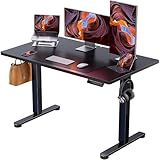
Overview: The ErGear Height Adjustable Electric Standing Desk provides a complete sit-stand solution emphasizing stability and safety. A solid steel frame reinforced with aerospace-grade connectors has endured over 100,000 test cycles. The included 47.2" x 23.6" tabletop offers immediate usability for single or compact dual-monitor setups. Height adjusts smoothly from 28.35 to 46.67 inches via an uprated motor tested for 50,000+ cycles.
What Makes It Stand Out: ErGear prioritizes indoor air quality with low-VOC materials meeting stringent US standards—critical for health-conscious buyers and enclosed offices. Three programmable memory presets enable instant height transitions. The complete package eliminates compatibility guesswork common with frame-only purchases while providing verified durability data.
Value for Money: Priced competitively against frame-only alternatives, the included surface and rigorous testing certifications justify the cost. You avoid the $50-150 expense and hassle of sourcing a compatible desktop separately, while gaining proven reliability.
Strengths and Weaknesses: Pros: Complete ready-to-use package, proven stability after extensive testing, low-VOC materials, quiet uprated motor, three memory presets. Cons: Narrow 23.6" depth limits monitor arms, height range slightly lower than premium alternatives, minimal cable management.
Bottom Line: A rock-solid choice for buyers prioritizing health certifications and tested durability over maximum workspace. Perfect for single-monitor users wanting a proven, complete solution without DIY complications.
4. PACEROCKER Walking Pad Treadmill with 12% 9-Level Auto Incline, 450 lbs Capacity Under Desk Treadmills for Home with Bluetooth Speaker, 5 MPH, Carbon Black
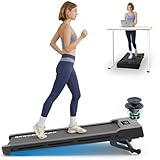
Overview: The PACEROCKER Walking Pad Treadmill redefines under-desk cardio with a 450-pound weight capacity and 12% auto-incline system. Nine incline levels simulate outdoor hiking, significantly boosting calorie burn. A 2.5HP motor maintains quiet operation at speeds up to 5 MPH. Bluetooth connectivity streams audio through integrated speakers, while the independent FitYo app provides lifetime access to 50+ coach-led courses and 100 training modes without subscription fees.
What Makes It Stand Out: This heavy-duty machine supports users far beyond typical 220-pound limits while remaining storage-friendly with built-in wheels for sliding under furniture. The dual-vent design separates motor cooling from speaker airflow, ensuring longevity and clear sound. Scenic route simulations add engaging variety.
Value for Money: Premium features command higher pricing, but the 450lb capacity, incline functionality, and free lifetime app content create strong value for heavy users. Standard walking pads cost less but lack incline and professional guidance.
Strengths and Weaknesses: Pros: Industry-leading weight capacity, effective 12% incline, whisper-quiet 2.5HP motor, free lifetime app, space-saving storage. Cons: 5 MPH limits running potential, expensive, heavy unit, calorie counter provides estimates only.
Bottom Line: Ideal for heavier individuals wanting incline training in compact form. If you need a walking pad that functions as a legitimate cardio machine with professional coaching, this premium option justifies its price.
5. FLEXISPOT Exercise Bike with 2D Desktop, Space Saving Under Desk Bike with Removable Desk, Stationary Bikes Upright Indoor Bikes with 8 Level Magnetic Resistance Upgraded Pro Flywheel, V9PRO-White

Overview: The FLEXISPOT V9PRO Exercise Bike elevates under-desk cycling with eight levels of magnetic resistance and an upgraded pro flywheel. This 2-in-1 bike integrates a spacious desktop for laptops and accessories, enabling productive pedaling during work. The magnetic system ensures whisper-quiet operation essential for conference calls. Family-friendly adjustability spans 5'1" to 6'2", while the 5-square-foot footprint fits any room.
What Makes It Stand Out: Magnetic resistance provides precise, silent intensity control from gentle circulation to moderate cardio—far superior to friction-based systems. The upgraded flywheel delivers smoother, more consistent momentum. Silent transport wheels simplify repositioning, and the 300-pound capacity ensures durability for daily use.
Value for Money: Priced slightly above FLEXISPOT’s basic model, the magnetic upgrade justifies the premium for noise-sensitive environments. It undercuts competitors like DeskCycle while offering integrated desk functionality that standalone bikes lack.
Strengths and Weaknesses: Pros: Silent magnetic resistance, smooth pro flywheel, family adjustability, compact footprint, integrated workspace, easy mobility. Cons: Desktop may vibrate at high resistance, moderate intensity only, lacks advanced metrics, assembly required.
Bottom Line: The magnetic resistance makes this the superior choice for office environments where silence is mandatory. Perfect for multitaskers prioritizing quiet, smooth operation over hardcore training intensity.
6. HiFast Walking Pad, 2.5HP Under Desk Treadmill for Home Office, 300 Lbs Capacity Portable Treadmills with Remote Control & LED Display, 2 in 1 Treadmill for Walking Jogging and Running

Overview: The HiFast Walking Pad delivers impressive performance for home office fitness, combining a robust 2.5HP motor with a 300-pound weight capacity. This under-desk treadmill features a spacious 15.75" x 38.58" running surface with advanced 5-layer non-slip technology and comprehensive shock absorption system, making it suitable for users of various sizes seeking low-impact exercise while working.
What Makes It Stand Out: What truly distinguishes this unit is its exceptional quiet operation at under 45 decibels—truly library-quiet—and its superior speed range of 0.6 to 4 mph, outpacing competitors limited to 3.8 mph. The memory function preserves your settings during pauses, a thoughtful touch for interrupted work sessions. At just 4.96 inches thick and 40.78 pounds with built-in wheels, it offers unparalleled portability and storage convenience.
Value for Money: Priced competitively within the under-desk treadmill category, the HiFast justifies its cost through premium features like the advanced shock absorption with six silicone cushions and two rubber pads, commercial-grade motor protection, and included remote control. Comparable models with similar specifications typically cost 20-30% more, making this an excellent mid-range investment.
Strengths and Weaknesses: Strengths include whisper-quiet operation, excellent weight capacity, superior shock absorption, memory function, and effortless portability. The LED display provides clear real-time metrics. Potential weaknesses include the memory resetting when powered off completely, and the remote control’s limited range may require direct line-of-sight.
Bottom Line: Ideal for professionals working from home, the HiFast Walking Pad excels in delivering quiet, effective workouts without disrupting productivity. Its combination of power, comfort, and space-saving design makes it a top contender for anyone seeking to integrate movement into their sedentary workday.
7. Walking Pad Treadmill, Portable Treadmills for Home, 2.5 HP Quiet Under Desk Treadmill with 5% Incline, 265/300 Lbs Capacity, 15" X 35.4" Running Walking Pad, Home Office Walking

Overview: This Walking Pad Treadmill brings a compelling twist to under-desk fitness with its integrated 5% incline feature, powered by a 2.5HP ultra-quiet motor. Supporting up to 265-300 pounds, it offers a 15" x 35.4" running surface with comprehensive 5-layer anti-slip cushioning, designed specifically for users wanting enhanced calorie burn during home office workouts.
What Makes It Stand Out: The built-in 5% incline sets this apart from flat walking pads, enabling significantly higher calorie expenditure without increasing speed. Operating under 45 decibels, it maintains office-friendly noise levels. The 0.5-4 mph speed range accommodates everything from casual walking to light jogging, while the remote control allows seamless adjustments without breaking stride.
Value for Money: This model offers outstanding value by incorporating incline functionality typically found in more expensive full-size treadmills. While lacking built-in wheels, its competitive pricing reflects the added engineering of the incline mechanism. For users prioritizing workout intensity over maximum portability, it delivers professional-grade features at a consumer-friendly price point.
Strengths and Weaknesses: Strengths include the effective incline feature, quiet operation, solid shock absorption, and comprehensive LED tracking. The motor performs reliably under load. However, the absence of built-in wheels reduces portability compared to competitors, and the slightly smaller running surface may feel restrictive for taller users. The incline is fixed rather than adjustable, limiting versatility.
Bottom Line: Perfect for fitness-focused professionals who want more than flat walking, this incline walking pad maximizes workout efficiency in minimal space. If you prioritize calorie burn over ultimate portability, this treadmill delivers exceptional results for home office integration.
8. DUMOS 63 Inch Electric Standing Desk Height Adjustable, Sit to Stand Computer Workstations Large Work PC Table Home Office Writing Gaming Desks with Memory Presets for Walking Pad, Bedroom, White

Overview: The DUMOS 63-Inch Electric Standing Desk transforms any workspace with its expansive surface and robust electric adjustment system. Accommodating multiple monitors and accessories with ease, this workstation adjusts from 28.7" to 48" in height, supporting up to 176 pounds through its reinforced steel T-leg frame designed specifically for stability at full extension.
What Makes It Stand Out: The massive 63-inch desktop provides exceptional real estate for complex setups, while the near-silent motor operates below 50 decibels. Three programmable memory presets enable one-touch height transitions, and the tool-free assembly promises setup in under 30 minutes—a rarity in this category. The frame’s wide T-leg design eliminates wobble even at maximum height.
Value for Money: While priced at the premium end, the DUMOS justifies its cost through superior stability testing (50,000+ cycles), commercial-grade construction, and the expansive workspace rarely found at this price point. Competitors with similar dimensions and stability features typically cost significantly more, making this an excellent long-term investment for serious professionals.
Strengths and Weaknesses: Strengths include exceptional stability, spacious surface, quiet operation, reliable memory presets, and remarkably easy assembly. The height range accommodates users from 5'2" to 6'5". Weaknesses include the single color option and the 176-pound capacity, which may limit some heavy-duty gaming setups. The control panel’s LED display is basic compared to smart-desk alternatives.
Bottom Line: For professionals and gamers needing maximum workspace with uncompromising stability, the DUMOS 63-Inch desk delivers premium performance. Its combination of size, solidity, and simplicity makes it a standout choice for dedicated home offices.
9. Sweetcrispy Electric Standing Desk Adjustable Height, 40x24 Inch Sit Stand Up Home Office Desks Computer Workstation PC Work Table with 3 Memory Preset Splice Wood Board Metal Frame, White
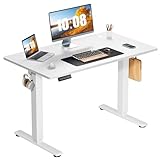
Overview: The Sweetcrispy Electric Standing Desk offers a balanced solution for home office ergonomics with its 40" x 24" dual-panel desktop and smooth electric height adjustment from 28.7" to 46.5". Supporting 176 pounds via its reinforced steel T-leg construction, this workstation targets users seeking a middle ground between compact and oversized standing desks.
What Makes It Stand Out: The dual-panel desktop design provides surprising rigidity while maintaining a modern aesthetic. Operating under 55 decibels, the motor is quiet enough for shared spaces. Three memory presets deliver convenient one-touch adjustments, and the 30-minute tool-free assembly process rivals the simplest setups in the market. The wide T-leg design ensures stability across the entire height range.
Value for Money: Positioned as a mid-range option, this desk delivers excellent value through its sturdy construction, tested durability (50,000+ lifts), and included memory presets—features often omitted in similarly priced competitors. The 40-inch width hits the sweet spot for single or dual-monitor setups without overwhelming smaller rooms.
Strengths and Weaknesses: Strengths include solid stability, appropriate size for most users, quiet operation, reliable presets, and straightforward assembly. The dual-panel design maintains flatness better than single-piece alternatives. Weaknesses include the slightly noisier motor compared to premium rivals, limited color options, and the two-piece desktop may not appeal to those preferring seamless surfaces.
Bottom Line: An excellent choice for home office workers needing reliable standing functionality without sacrificing too much space. The Sweetcrispy desk balances performance, practicality, and price, making it ideal for apartments and modest home offices where quality matters.
10. HUANUO 32" Small Electric Standing Desk Adjustable Height, 4 Memory Height Settings, Sit Stand Up Desk for Home Office & Computer Workstation, LightWalnut

Overview: The HUANUO 32" Small Electric Standing Desk caters to compact spaces with its streamlined design and impressive functionality. Adjusting from 28.3" to 46.5" in height, this workstation supports 176 pounds through its high-quality steel frame. The two-piece spliced desktop features rounded corners for safety, while four programmable memory presets provide enhanced customization for multiple users.
What Makes It Stand Out: The four memory presets exceed the standard three-button configuration, making it perfect for households with varying user preferences. Available in multiple sizes (up to 71 inches) and colors, HUANUO offers customization rarely seen in this category. The motor, though unspecified in decibels, delivers smooth transitions tested to 50,000 lift cycles, ensuring long-term reliability.
Value for Money: This desk punches above its weight class by offering premium features—four presets, size options, and robust steel construction—at a budget-friendly price point. While the 32-inch model suits minimal setups excellently, the ability to scale up without switching brands adds tremendous value. Assembly requires minimal effort with fewer steps than competitors.
Strengths and Weaknesses: Strengths include exceptional customization options, four memory presets, compact footprint, durable steel construction, and easy assembly. The rounded corners enhance safety in tight spaces. Weaknesses include the smaller surface area limiting multi-monitor setups, unspecified noise levels, and the spliced desktop may flex slightly under heavy loads compared to single-piece tops.
Bottom Line: Perfect for small apartments, dorm rooms, or minimalist workspaces, the HUANUO 32" desk delivers premium adjustability in a compact package. If space is at a premium but you refuse to compromise on standing desk benefits, this is your ideal solution.
Why Choose a Standing Desk for Your Home Office?
The modern home office often doubles as a dining table, kitchen counter, or corner of the bedroom—rarely designed with eight-hour workdays in mind. Prolonged sitting compresses spinal discs, reduces circulation, and contributes to the dreaded afternoon energy crash. Standing desks address these issues by encouraging micro-movements and postural changes throughout your day. Research consistently shows that alternating between sitting and standing can reduce back and neck pain by up to 54% while boosting productivity and focus. For under $300, you’re not just buying furniture; you’re investing in a tool that actively supports your physical wellbeing during remote work.
Understanding the $300 Price Point: What to Expect
At this budget tier, you’re entering the entry-level to mid-range market for manual desks and the absolute basement for electric models. Expect manual crank or pneumatic lift mechanisms rather than premium dual-motor electric systems. Desktop surfaces will typically feature laminated particle board rather than solid wood or high-pressure laminate. Frame materials generally include steel tubing with powder-coated finishes. While you won’t get whisper-quiet operation or smartphone connectivity, you can absolutely achieve stable height adjustment and sufficient durability for daily use. The trade-offs usually involve speed of adjustment, weight capacity, and long-term motor reliability—factors we’ll explore in detail.
Manual vs. Electric Standing Desks: Making the Right Choice
Your first major decision involves the lift mechanism type. This choice fundamentally impacts cost, reliability, and user experience.
Crank-Operated Manual Desks: Pros and Cons
Hand-crank desks dominate the sub-$300 category for good reason. They eliminate electronic components, reducing both cost and potential failure points. A well-designed crank system adjusts smoothly through 20-30 turns per inch of height change, typically supporting 100-150 pounds. The workout is minimal—more tedious than physically demanding. These desks excel in reliability; with no motors to burn out, they’ll function indefinitely with basic maintenance. The downside? Adjusting multiple times daily becomes tiresome, potentially discouraging you from changing positions as often as ergonomics experts recommend.
Pneumatic Lift Desks: The Middle Ground
Pneumatic desks use gas springs similar to office chair height controls, offering near-instant adjustment without electricity. Press a lever, and the desktop floats up or down with minimal effort. This technology appears occasionally under $300, though usually in smaller, laptop-focused designs. The smooth, quick operation encourages frequent position changes, but weight capacity rarely exceeds 50-75 pounds. Heavier setups cause the desk to sag or require manual assistance to lift. The internal seals can also degrade after 2-3 years of heavy use, eventually requiring replacement.
Electric Motors: Are They Viable Under $300?
Single-motor electric desks have recently dipped into the $250-$300 range, but this achievement comes with caveats. These budget motors typically manage 70-100 pounds at speeds of 0.5-0.7 inches per second—noticeably slower than premium models. Duty cycles (how long the motor can run before needing a cool-down period) may be limited to 2-3 minutes, meaning full range adjustments require patience. Warranty coverage often drops to just 1-2 years for electronic components. If you choose this route, prioritize models with overload protection and thermal cutoffs to prevent premature motor failure.
Key Features That Define Quality in Budget Desks
Certain specifications reveal more about real-world performance than marketing claims ever could.
Height Adjustment Range: Finding Your Perfect Fit
The usable range matters more than the total span. For proper ergonomics, your elbows should rest at 90 degrees while typing, with the monitor at eye level. This typically requires a desk surface that adjusts from 28-29 inches (for seated 5'2" users) up to 45-47 inches (for standing 6'3" users). Budget desks often bottom out at 30 inches and top out at 43 inches, potentially excluding taller individuals. Always measure your ideal seated and standing elbow heights before purchasing, then subtract 1-2 inches for keyboard and monitor mount thickness.
Weight Capacity: What Your Desk Needs to Support
Calculate your total load: monitor (8-15 lbs), monitor arm (5-10 lbs), laptop (3-7 lbs), keyboard and mouse (2 lbs), desktop accessories (5-10 lbs), and any additional items. Most sub-$300 manual desks advertise 100-176 lb capacities, but these figures represent static loads distributed evenly. Real-world performance drops significantly with off-center weight or dynamic loads (leaning, typing). For dual-monitor setups or heavier all-in-one computers, target desks rated for at least 130 pounds to maintain stability and smooth operation.
Desktop Dimensions: Space Planning Essentials
Budget desks typically offer surfaces from 40" x 24" (compact) to 55" x 24" (standard). Depth is the critical factor; 24 inches barely accommodates a monitor on a stand with keyboard in front. If using monitor arms, you can maximize usable space, but 30-inch depth provides far more flexibility. Consider your room layout carefully—crank handles add 2-3 inches to the width, and some frames require additional clearance at the back for stability bars.
Frame Construction: Steel vs. Aluminum vs. Alloy
Steel frames provide the best stability-to-cost ratio in this price range. Look for 1.5mm to 2mm thick steel tubing with powder-coated finishes to resist scratches and rust. Aluminum appears in some lightweight designs but flexes more under load. “Alloy” is often marketing speak for aluminum-steel composites—verify actual material thickness rather than accepting vague descriptions. The connection points between legs and feet matter enormously; single-bolt attachments create wobble, while multi-point brackets or welded joints dramatically improve rigidity.
Stability Concerns: The Make-or-Break Factor
Nothing ruins a standing desk experience like a workspace that shudders with every keystroke. Stability separates worthwhile budget options from frustrating wastes of money.
Wobble at Height: What Causes It and How to Minimize It
Wobble stems from three sources: loose connections, insufficient leg thickness, and narrow footprints. At maximum height, a desk becomes a lever—any play in joints multiplies into noticeable movement. Test for stability by checking lateral (side-to-side) and front-to-back flex. Budget desks can minimize wobble through design: wider feet (at least 24 inches apart), thicker legs (avoid anything under 1.2 inches diameter), and cross-support structures. Read reviews specifically mentioning stability at maximum height, as manufacturers rarely address this in specifications.
Crossbar Support: Is It Necessary?
Center crossbars connecting the legs significantly reduce lateral wobble but limit legroom and under-desk storage. Some budget designs use hidden crossbars mounted low or rear stability bars that don’t interfere with knees. If you prefer open leg space, prioritize desks with reinforced leg brackets and heavier gauge steel. For maximum stability with heavy monitor setups, accept the crossbar trade-off—it typically adds 30-40% more lateral rigidity.
Foot Design and Floor Protection
Adjustable leveling feet are non-negotiable for uneven home floors. Look for wide, rubber-coated feet that distribute weight and prevent scratching. Some budget desks include non-adjustable plastic glides that perform poorly on anything but perfectly level surfaces. The foot-to-leg attachment should use multiple bolts; single-screw designs loosen over time and create wobble. For carpeted rooms, consider foot size—larger footprints prevent sinking and maintain stability.
Desktop Materials: Balancing Cost and Durability
The surface you work on affects everything from mouse tracking to long-term durability.
Laminated Particle Board: The Standard Choice
Most sub-$300 desks use medium-density fiberboard (MDF) or particle board with heat-laminated surfaces. Quality varies dramatically. High-pressure laminate (HPL) resists scratches and moisture better than low-pressure alternatives. Check laminate thickness—0.5mm is minimal, while 1mm+ provides better edge protection. The core material density matters too; heavier boards indicate better compression and reduced sagging. Avoid desks with visible screws through the desktop surface, as these create stress points that crack over time.
Bamboo and Wood Alternatives
Occasionally, bamboo tops appear in this price range, usually as thinner (0.5-0.75 inch) panels. Bamboo offers environmental appeal and natural antimicrobial properties but can splinter at edges if not properly sealed. Thinner bamboo tops may sag under heavy loads without additional support beams. True wood veneers are rare under $300; when present, they’re paper-thin and easily damaged. For most users, quality laminate provides better durability and moisture resistance than budget wood options.
Edge Banding and Surface Finish Quality
Inspect product photos for edge banding—the protective strip covering desktop edges. PVC banding should be seamless and heat-applied, not glued. Poor edge banding peels within months, exposing the fiberboard core to moisture damage. The surface finish should resist fingerprints and have a slight texture for mouse use without a pad. Glossy finishes show every scratch and create monitor glare.
Assembly Reality Check: What You’re Getting Into
Budget standing desks arrive flat-packed and require substantial assembly. Understanding the process prevents frustration.
Tool Requirements and Included Hardware
Most desks include basic Allen wrenches but require your own Phillips screwdriver and sometimes adjustable wrenches. Higher-quality kits provide labeled hardware bags and pre-drilled pilot holes. Lower-end options may have misaligned holes requiring forceful assembly. Check reviews mentioning hole alignment—this is a common assembly pain point. Some manufacturers now include thread-locking compound for critical bolts, a sign of thoughtful engineering.
Estimated Assembly Time for Non-Experts
Plan for 60-90 minutes of focused work for manual desks, 90-120 minutes for electric models due to wiring. This assumes basic mechanical aptitude and a clear workspace. The process typically involves: attaching feet to legs, connecting the frame to the desktop, installing the lift mechanism, and final adjustments. Video tutorials help immensely; check manufacturer websites before purchasing. Having a second person available for flipping the assembled desk upright prevents damage and back strain.
Common Assembly Pitfalls to Avoid
Overtightening bolts before all are loosely installed warps the frame and creates wobble. Always hand-tighten all bolts first, then fully tighten in a cross pattern. For electric desks, route cables away from moving parts before final assembly—pinching wires during height adjustment destroys the control box. Don’t discard the small packet of extra screws; these are often for securing cable management clips added later. Finally, assemble on a soft surface (cardboard or carpet) to prevent scratching the desktop.
Ergonomic Essentials Beyond the Desk Itself
A standing desk is just the foundation. Proper ergonomics require additional considerations. Your monitor height needs independent adjustment—a monitor arm is arguably more important than the desk itself for neck health. Budget gas-spring arms cost $30-50 and attach via C-clamp or grommet mount. Anti-fatigue mats ($25-40) dramatically improve standing comfort by encouraging subtle leg movements. These accessories push your total investment slightly over $300 but transform the experience from tolerable to truly comfortable.
Cable Management Solutions on a Budget
Exposed cables look chaotic and get pinched during height adjustments. Most budget desks include minimal cable management—perhaps a few adhesive clips. Effective solutions include under-desk cable trays ($15-25) that screw into the desktop underside, spiral wrap for bundling, and adhesive cable raceways along legs. Plan your cable lengths carefully; cables must have enough slack for full height adjustment without pulling. Power strips should mount to the desktop underside or a fixed leg, never to a moving component.
Maximizing Your Investment: Longevity Tips
Budget materials require proactive care. Tighten all bolts monthly for the first three months as the frame settles, then quarterly thereafter. Clean and occasionally lubricate crank mechanisms with dry silicone spray—not WD-40, which attracts dust. For electric desks, avoid exceeding 80% of the weight rating to reduce motor strain. If the desk won’t be adjusted for extended periods, lower it to mid-height to reduce stress on lift columns. Keep desktops dry; wipe spills immediately to prevent particle board swelling. These simple habits can double the functional lifespan of a budget desk.
The Health Benefits: Why It’s Worth the Switch
The first week brings noticeable changes: reduced afternoon back stiffness, increased energy levels, and better focus. Long-term benefits include improved circulation, reduced risk of weight gain, and lower incidence of chronic back issues. The key is alternating positions every 30-60 minutes rather than standing all day. Budget desks facilitate this movement pattern just as effectively as premium models. Many users report productivity gains of 10-15% simply from reduced discomfort and fewer breaks needed to stretch. For under $300, this represents one of the highest ROI health investments for remote workers.
Common Mistakes When Buying Budget Standing Desks
First, don’t prioritize electric over manual if it means sacrificing weight capacity or stability—a shaky electric desk is worse than a stable manual one. Second, avoid “too good to be true” pricing; desks under $150 often use thinner materials that fail within a year. Third, don’t ignore depth; a 20-inch deep desk forces you to choose between proper monitor distance and keyboard position. Fourth, never buy without checking real-user stability reviews at maximum height. Finally, don’t forget to measure your doorway—fully assembled standing desks rarely fit through standard 30-inch doors if you need to relocate.
Frequently Asked Questions
1. Can I really get a quality standing desk for under $300?
Absolutely. While you won’t get premium features like programmable memory presets or whisper-quiet motors, many manual and some electric desks in this range offer stable, reliable height adjustment. Focus on steel frame construction and adequate weight capacity rather than fancy electronics.
2. How long do budget standing desks typically last?
Manual crank desks often last 5-10 years with basic maintenance. Budget electric desks typically see 3-5 years of reliable service before motor components may need replacement. Lifespan heavily depends on staying within weight limits and avoiding excessive adjustment cycles.
3. What’s the minimum depth I should accept for a functional setup?
24 inches is the absolute minimum, but 30 inches provides far better ergonomics. With 24-inch depth, you’ll need monitor arms to position screens at proper viewing distance while maintaining space for keyboard and mouse.
4. Are electric standing desks under $300 worth the risk?
They can be, but choose carefully. Prioritize models with overload protection, at least a 2-year motor warranty, and verified user reviews mentioning quiet operation. Be realistic about slower adjustment speeds and lower weight capacities compared to premium alternatives.
5. How do I know if a desk will be stable at standing height?
Check for wide foot placement (minimum 24 inches apart), leg tube thickness over 1.2 inches, and user reviews specifically mentioning stability at maximum height. Crossbar supports dramatically improve stability if you can tolerate reduced legroom.
6. Can I assemble a standing desk alone?
Most people can, but it’s challenging. The desktop and frame are heavy and awkward to maneuver. A second person makes the process safer and prevents damage when flipping the completed desk upright. Plan for 60-120 minutes depending on the model.
7. What’s the ideal height adjustment range for a 6-foot tall person?
You need a maximum height of at least 45 inches for proper elbow positioning. Taller individuals (6'3"+) should target 47+ inches. Always measure your standing elbow height and add 1-2 inches for keyboard thickness to determine your specific requirement.
8. Do I need a monitor arm with a standing desk?
Strongly recommended. Even with perfect desk height, monitor arms allow independent screen positioning for proper neck posture. They also free up valuable desktop real estate. Budget gas-spring arms costing $30-50 offer excellent value.
9. How much weight can I realistically put on a budget standing desk?
Stay 20-30% below the advertised rating for smooth operation and longevity. If a desk claims 150-pound capacity, load it with no more than 100-120 pounds distributed evenly. Off-center loads like heavy monitors on arms reduce effective capacity further.
10. Will a standing desk help with my back pain?
Most users experience significant improvement within 2-4 weeks. The key is alternating positions rather than standing constantly. Start with 20-30 minute standing intervals and gradually increase. An anti-fatigue mat and proper monitor height are essential for maximum benefit.
See Also
- 10 Best Budget Standing Desks Under $300 for Students
- 10 Best Budget Electric Standing Desks Under $400 for Students
- 10 Best Value Standing Desks for Home Office Productivity in 2026
- Top 10 Best Electric Standing Desks for Home Office Productivity in 2026
- Top 10 Electric Standing Desks for Home Office Wellness in 2026